分类 网站装修 下的文章

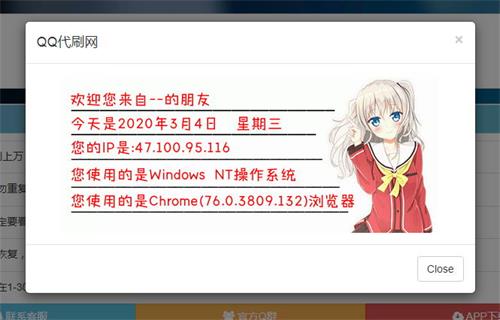
一个时下比较火的代刷网在线下单提醒代码

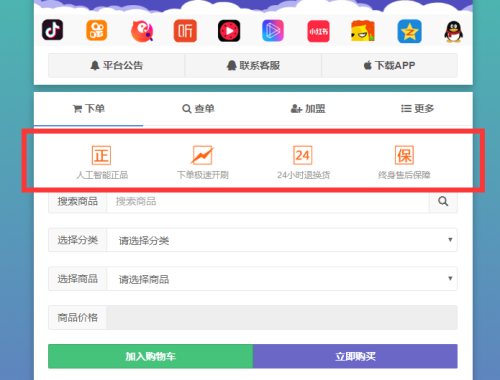
效果图如下:

将代码填入【在线下单公告】栏即可,具体代码内容如下:

<div class="row" style="padding:0px 20px 10px;line-height:18px; color:#999;font-size:12px">
 
			<div class="col-xs-3" style="padding:0px 5px">
 
			<center>
 
				<img src="https://s2.ax1x.com/2019/05/24/VizrcD.png" alt="人工智能正品" class="img-responsive" style="max-width:63px;display:inline;"><br>
 
				<span>人工智能正品</span>
 
			</center>
 
			</div>
 
			<div class="col-xs-3" style="padding:0px 5px">
 
			<center>
 
				<img src="https://s2.ax1x.com/2019/05/24/VizRAI.png" alt="下单极速开刷" class="img-responsive" style="max-width:63px;display:inline"><br>
 
				<span>下单极速开刷</span>
 
			</center>
 
			</div>
 
			<div class="col-xs-3" style="padding:0px 5px">
 
			<center>
 
				<img src="https://s2.ax1x.com/2019/05/24/VizWNt.png" alt="24小时退换货" class="img-responsive" style="max-width:63px;display:inline"><br>	
 
				<span>24小时退换货</span>
 
			</center>
 
			</div>
 
			<div class="col-xs-3" style="padding:0px 5px">
 
			<center>
 
				<img src="https://s2.ax1x.com/2019/05/24/Vizf4P.png" alt="终身售后保障" class="img-responsive" style="max-width:63px;display:inline"><br>		
 
				<span>终身售后保障</span>	
 
			</center>
 
			</div>
 
		</div>

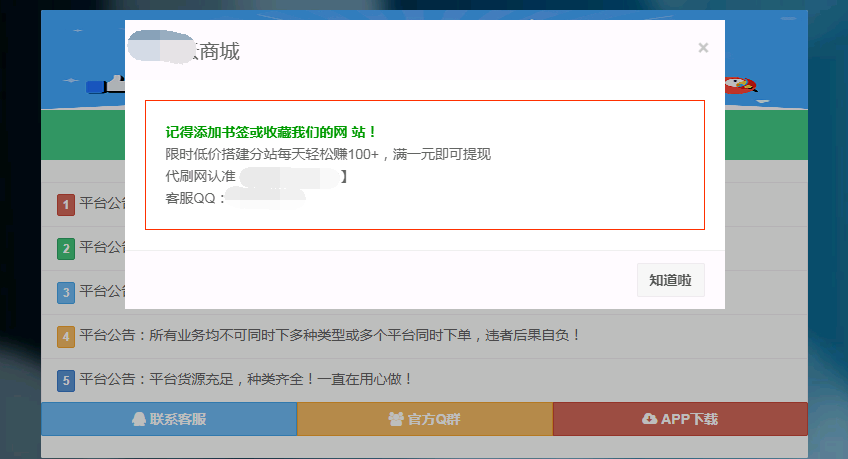
弹窗代码就是用户第一次打开代刷网的时候弹出的一个弹窗!一个好的弹窗代码可以体现出网站的专业度和信任度,也可以在弹窗代码加入QQ售后群的链接,方便用户第一次访问即时不下单也可以添加我们的售后QQ群观察我们的专业程度!

样式就是如图这样的,如果需要可以直接复制以下代码放到后台的弹出公告代码里就OK了

<div style="border: solid #FF3300 1px; padding: 20px;margin: 5px;"><p style="color: #009900"><b>记得添加书签或收藏我们的网

站! </b></p><p>限时低价搭建分站每天轻松赚100+,满一元即可提现</p><p>代刷网认准【你的网址】</p><p>客服QQ:你的QQ</p></div>  	

注意:只适合弹出公告,放在首页公告可能会导致乱码现象,如果出现乱码把代码全删了就行了!如果不会可以联系我们为您处理好您的站点美化,如果您看到有好看的界面不会弄,也可以联系我们扒下代码使用!

今天从某个网站看到了一个非常好看的栏目导航,于是就把他拔下来了,放到代刷网上面也是非常美观的,而且这个栏目导航可以引导客户找到商品目录和商品,应该可以提高代刷网的销量和用户体验,先来看看效果图:
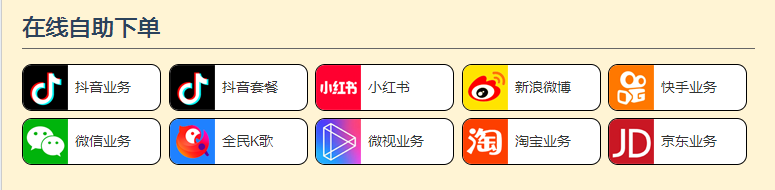
代刷网栏目导航美化代码

只要你有这个技术和能力,你可以把上面的导航图标和栏目名称都给换掉,如果不会修改的话也是有点麻烦,因为毕竟不是所有的代刷网都有以上十种业务的,比如淘宝和京东业务就很多代刷平台是没有销售的,因此必须自己想办法换掉或者去增加没有的商品类型。而今天我给大家分享的则是这种导航菜单的代码大家可以根据自己的需要任意修改。

1、把下面的样式代码放到你的代刷网源码里面使用模板对应的样式表里面去

<style>
.zzxd-box { padding: 20px; border: 1px solid #ccc; overflow: hidden; background: #333; background:#fff4d4;}
.zzxd-box h2 { font-size:22px; line-height:30px; border-bottom: 1px solid #666; padding: 5px 0px;   margin-bottom: 15px; font-weight:blod;}
.zzxd-box h2 a { float:right; font-size: 12px; line-height: 30px; display: block; width: 80px; height: 30px; background: red; color: #fff; text-align: center; border-radius: 5px; text-decoration: none;}
.zzxd-box ul { list-style: none; width: 101%; overflow: hidden; margin: 0px; padding: 0px;}
.zzxd-box ul li { float: left; min-width: 120px; width: 18.8%; margin-right: 1%; margin-bottom: 1%; line-height: 45px; border: 1px solid #000; border-radius: 10px; overflow: hidden;background: #fff;}
.zzxd-box ul li a { display: block; height: 45px; width: 100%; font-size: 14px; color: #333; text-decoration: none; }
.zzxd-box ul li i { display: block; width: 45px; height: 45px; float: left; margin-right: 7px;background:url(/images/yewuicobg.png) no-repeat;}
.zzxd-box ul li:hover a { color: #fff;}
.zzxd-box ul li i.dy_ico { background-position: 0px 0px;}
.zzxd-box ul li i.hs_ico {background-position: 0px -50px;}
.zzxd-box ul li i.wb_ico {background-position: 0px -100px;}
.zzxd-box ul li i.ks_ico {background-position: 0px -150px;}
.zzxd-box ul li i.wx_ico {background-position: 0px -200px;}
.zzxd-box ul li i.qm_ico {background-position: 0px -250px;}
.zzxd-box ul li i.ws_ico {background-position: 0px -300px;}
.zzxd-box ul li i.tb_ico {background-position: 0px -350px;}
.zzxd-box ul li i.jd_ico {background-position: 0px -400px;}
.zzxd-box ul li.li_dy:hover {background: #000;}
.zzxd-box ul li.li_hs:hover {background: #ff0030;}
.zzxd-box ul li.li_wb:hover {background: #ffe400;}
.zzxd-box ul li.li_ks:hover {background: #ff7800;}
.zzxd-box ul li.li_wx:hover {background: #00b40e;}
.zzxd-box ul li.li_qm:hover {background: #1f81ff;}
.zzxd-box ul li.li_ws:hover {background: #f74281;}
.zzxd-box ul li.li_tb:hover {background: #fd3f00;}
.zzxd-box ul li.li_jd:hover {background: #c91724;}
</style>  

2、然后把下面的这段代码放到你的代刷网后台“首页公告”里面去,这个代码结合QQ代刷网站点公告装修美化代码会更完善更好用。

<section class="zzxd-box">
<h2>在线自助下单</h2>
<ul>
<li class="li_dy"><i class="dy_ico"></i><a href="栏目链接">抖音业务</a></li>
<li class="li_dy"><i class="dy_ico"></i><a href="栏目链接"">抖音套餐</a></li>
<li class="li_hs"><i class="hs_ico"></i><a href="栏目链接"">小红书</a></li>
<li class="li_wb"><i class="wb_ico"></i><a href="栏目链接"">新浪微博</a></li>
<li class="li_ks"><i class="ks_ico"></i><a href="栏目链接"">筷首业务</a></li>
<li class="li_wx"><i class="wx_ico"></i><a href="栏目链接"">微信业务</a></li>
<li class="li_qm"><i class="qm_ico"></i><a href="栏目链接"">全民K歌</a></li>
<li class="li_ws"><i class="ws_ico"></i><a href="栏目链接"">微视业务</a></li>
<li class="li_tb"><i class="tb_ico"></i><a href="栏目链接"">淘宝业务</a></li>
<li class="li_jd"><i class="jd_ico"></i><a href="栏目链接"">京东业务</a></li>
</ul>
</section>

3、把代码里面的栏目链接改为你自己对应栏目的链接,刷新代刷网首页即可看到效果。其实对于有些没有源码的站长而言,可以把样式和代码都一起放到后台公告处也可以实现。

4、这个栏目导航美化代码在电脑端是非常好看的,但是在手机端可能兼容性不是很好,需要自己根据你所使用的代刷网模板去调整样式哦,这因为每个代刷网使用的模板都是不同的。
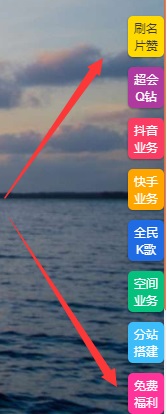
上回已经有分享一个右侧导航栏代码了,两个右侧导航栏代码其实都差不多,主要就是显示的外表不同,看自己喜好觉得哪个好看就选择哪个吧。

具体效果图如下:

代码内容如下:

Markup

<style>
.elevator_item .hd-time-limited {
display: block;
position: fixed;
right: 0;
bottom: 445px;
width: 40px;
height: 140px;
background: url(assets/img/right.png) no-repeat center;
}

.elevator_item {
position: fixed;
right: 0;
bottom: 95px;
z-index: 11;
}
.elevator_item .feedback {
width: 36px;
height: 41px;
font-size: 12px;
padding: 5px 6px;
display: block;
border-radius: 5px;
text-align: center;
margin-top: 10px;
box-shadow: 0 1px 2px rgba(0,0,0,.35);
cursor: pointer;
}
.graHover {
position: relative;
overflow: hidden;
}
</style>
<div class=”elevator_item” id=”elevator_item” style=”display:block;”>
<a target=”_self” class=”feedback graHover” style=”background-color: #3cbdfa;color:#fff;” href=”/user/reg.php” rel=”nofollow”>分站搭建</a>
<a target=”_self” class=”feedback graHover” id=”sign_daily” style=”background-color: #ffd900;color:#383838;” rel=”nofollow” href=”商品链接”>刷名片赞</a>
<a target=”_self” class=”feedback graHover” style=”background-color: #AF3A9F;color:#fff;” href=”商品链接” rel=”nofollow”>超会Q钻</a>
<a target=”_self” class=”feedback graHover” style=”background-color: #fa3c63;color:#fff;” href=”商品链接” rel=”nofollow”>抖音业务</a>
<a target=”_self” class=”feedback graHover” style=”background-color: #ffa500;color:#fff;” href=”商品链接” rel=”nofollow”>快手业务</a>
<a target=”_self” class=”feedback graHover” style=”background-color: #1e6be3;color:#fff;” href=”商品链接” rel=”nofollow”>全民K歌</a>
<a target=”_self” class=”feedback graHover” style=”background-color: #06C17E;color:#fff;” href=”商品链接” rel=”nofollow”>空间业务</a>
<a target=”_self” class=”feedback graHover” style=”background-color: #FF3399;color:#fff;” href=”商品链接” rel=”nofollow”>免费福利</a>
</div>